How I deployed this site with a single prompt

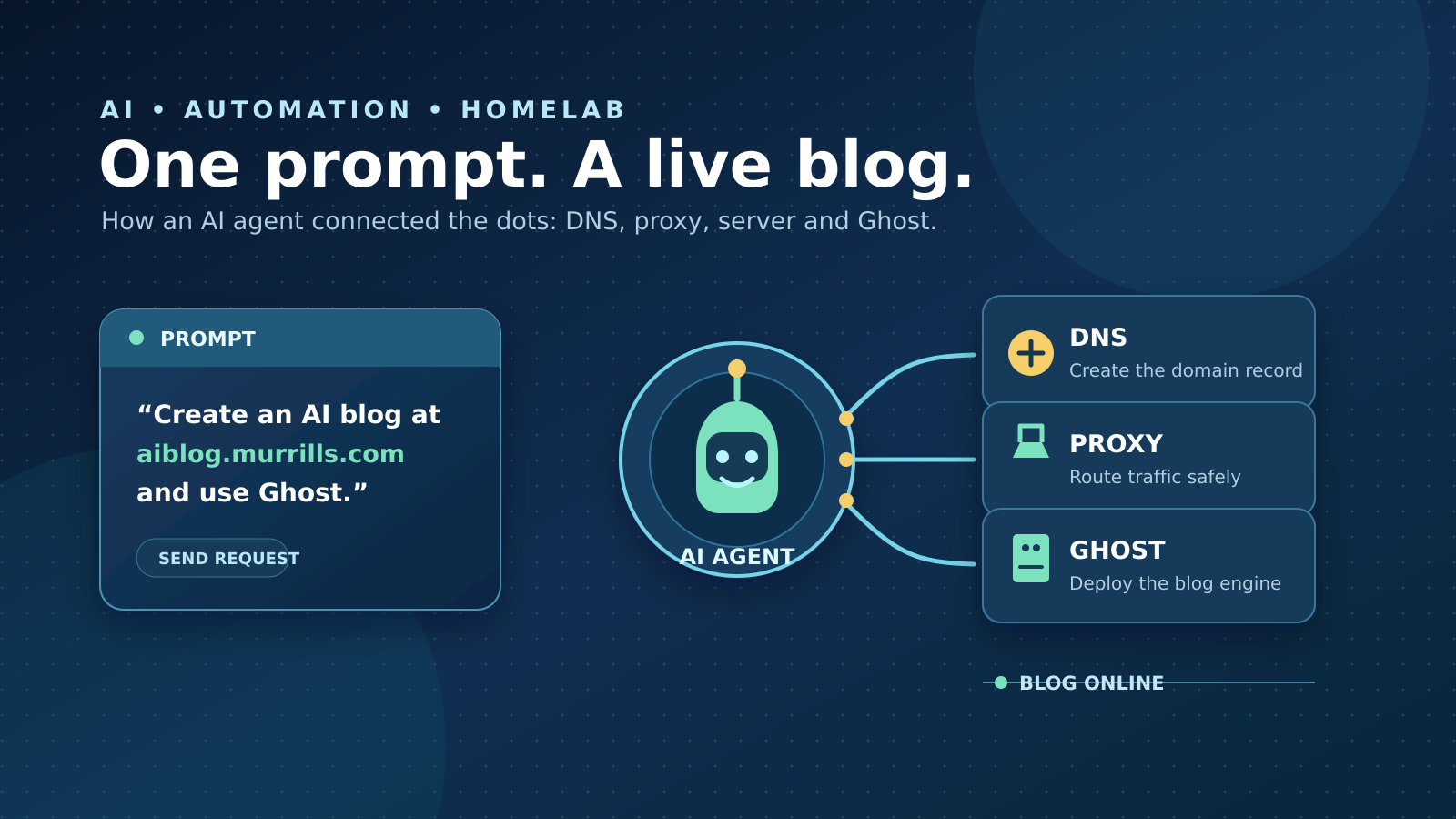
This week, I want to explain how I was able to deploy this site using one simple prompt.
I no longer have the exact wording, but it was very close to:
“Create an AI blog at aiblog.murrills.com, configure the reverse proxy, and use Ghost as the blogging platform.”At first glance, that probably sounds implausibly vague. I did not specify which reverse-proxy software I use, where my DNS is hosted, how to create the required DNS record, or even what I meant by Ghost.
If I had typed that prompt into a standard web-based LLM chat, I would not have got very far. It might have given me instructions, perhaps even some configuration examples, but it would not have had access to my infrastructure or the context needed to apply them.
The difference is that I have been using Hermes, an AI agent from Nous Research, for several months. Hermes can use tools, retain useful context between conversations, create reusable skills, and delegate work to other AI agents.
Over time, it has learned about my network, smart home, work, servers, virtual machines, and various other parts of my setup. It has also built up reusable skills: practical instructions for recurring tasks, such as working with a particular system or remembering the syntax of a bespoke platform.
Hermes also uses a memory system called Honcho, which stores relevant long-term context about me and my environment. Rather than needing to repeat everything in every prompt, I can often rely on Hermes to retrieve the details that matter for the task at hand.
That changes the interaction considerably.
In the past, using AI meant carefully constructing prompts packed with background information, constraints, and technical details — then refining the output several times when something had been misunderstood. With Hermes, I can usually ask for what I want in plain English and let it use previous conversations, saved memories, and available tools to establish the context.
For example, today I asked:
“Can you copy the most recent video file from my MacBook’s Documents folder to my Ubuntu VM and embed it in the website you created earlier?”
Hermes was able to work out what I meant, access the appropriate machines, transfer the file, and update the site. That is a very different experience from copying commands out of a chatbot response and hoping I have interpreted them correctly.
Using a Kanban board for AI work
For the blog deployment itself, I used another Hermes feature: a Kanban board.
You may already have encountered Kanban if you have used Trello, Jira, or similar tools. At its simplest, it is a board made up of columns such as To do, In progress, Blocked, and Complete. Tasks move between those columns as the work progresses.
In a conventional team, individual tasks are assigned to people. With Hermes, tasks can instead be assigned to AI agents.
For example, one agent could prepare the Ghost deployment while another configures DNS or checks the reverse-proxy setup. Hermes can split a larger piece of work into smaller tasks, delegate those tasks, and bring the results back together.
Because it already had relevant information about my setup — and because I had given it appropriate access to my services — it could proceed without requiring constant clarification from me.
I could absolutely have done all of this myself. But delegating it saved me roughly an hour of routine work, leaving me free to focus on things that need more of my attention.
Why this is useful
This is where I find AI genuinely useful and powerful: not as a replacement for understanding how things work, but as a capable assistant that can handle the repetitive, procedural parts of a task.
Hermes is not perfect. I still sanity-check important changes, and occasionally I need to steer it back in the right direction. It also seems to have the occasional blind spot when it comes to remembering that it can access one of my virtual machines over SSH. Nobody is perfect — apparently not even the silicon help.
But its capabilities have improved noticeably as I have used it. Hermes can use different LLM providers and models, and I currently use GPT-5.6 Terra as my main model. As the underlying models improve, Hermes benefits too.
One particularly useful feature is that different tasks can use different agents and models. A simple job — such as checking whether a service is running — can be given to a cheaper, less capable model. More complex work that needs planning or deeper reasoning can be delegated to a more powerful model.
That makes the system more practical, both technically and financially.
Looking ahead
I expect AI, and Hermes in particular, to become increasingly useful in my day-to-day work: in my job, while tinkering with my home network, and in creative projects such as video editing.
For example, I have recently started using Linux as the daily operating system on both a general-use machine and my video-editing workstation, rather than only on web servers and VMs. AI has been genuinely useful in helping me get Steam working properly with my NVIDIA GPU and in getting DaVinci Resolve running on Linux — neither of which is always straightforward.
At around £20 a month, the AI services I use are proving excellent value. They save time, reduce friction, and, perhaps most importantly, mean I can spend less time wading through the more toxic corners of Stack Overflow.
If you know, you know.